
What is FRP Lock?
You might have seen the Google verification screen after resetting an Android phone. That security check is called Factory Reset Protection (FRP).
Google added FRP in Android 5.1 Lollipop to protect devices from people who shouldn’t access them. Today it is enabled on every Android phone by default.
The feature becomes active soon as a Google account is added to the device. After that Android remembers the Google account that was used. If someone resets the phone without removing that Google account the setup process will ask for the same Google account before the device can be used again.
Why Does FRP Exist?
A years ago resetting a phone was enough to remove all user information.. That also made it easy for people to reuse stolen phones.
FRP changed that.
Now even if someone performs a factory reset Android checks the Google account that was previously connected to the device. Until the correct Google account is verified, the phone stays locked on the activation screen.
Because of this a simple factory reset no longer removes the protection of the owners Google account.
How Does It Help?
The main purpose of FRP is to protect the owners Google account and personal data.
If a phone is lost or stolen another person cannot easily set it up as a device. The system requires the synced Google account before it allows access. This reduces the chances of use and helps keep personal information secure.
Some users encounter FRP after forgetting their Google account password or buying a phone that was not properly reset. In cases the issue can be avoided by removing the Google account before performing a factory reset.
Final Thoughts
FRP is one of the useful security features available on Android. While it can sometimes create problems for users who forget their Google account details its primary purpose is to protect personal data and discourage device theft.
Before resetting, selling or giving away your phone always remove every Google account from the device settings. Doing so prevents FRP from appearing during the setup and ensures a smooth experience, for the next owner of the phone with their own Google account.
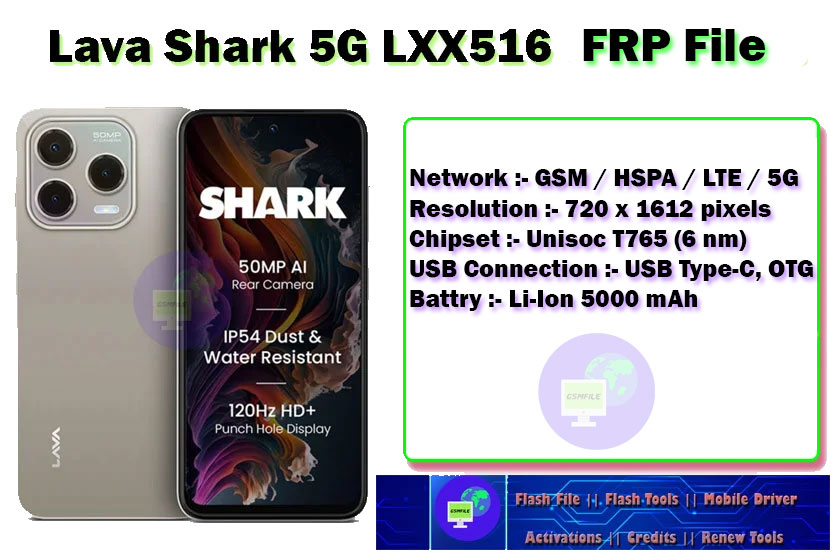
Lava Shark 5G LXX516 Specifications :-
Network :- GSM / HSPA / LTE / 5G
Resolution :- 720 x 1612 pixels
Chipset :- Unisoc T765 (6 nm)
USB Connection :- USB Type-C, OTG
Battry :- Li-Ion 5000 mAh
Note :- Source is gsmarena.com
Lava Shark 5G LXX516 File Info
Name :- Lava Shark 5G_LXX516 FRP Remove File By GsmFile.in.rar
Size :- 492.11 KB
Format :- .ZIP
Status :- Paid [ ₹100 Only ]
Download Source :- Mediafire
Need important Requirements
- Proof of Ownership from the customore.
- Device information (brand, model, Android version, security patch level).
- Appropriate service software and drivers compatible with the device.
- USB cable and a computer.
- Access to the device’s authorized service or recovery procedures.
File Paid [ ₹100 Only ]
How To Use This File
➡ First You Need To Download Flash File.
➡ After Download Done Just Contact Us For Service.
➡ Charges 100₹ For Servicy ( if You Need ).
➡ After Zip Unlock Just Open Flash Tool And Load File.
➡ Make Sure Drivers Properly Installed And Connect Device With Test Point Key.
Common Errors and fixes
## Important Notes
– This guide is for educational and servicing purposes only.
– Make sure the device belongs to you or your customer.
– Backup important data before proceeding.
Read More :- Lava Z3 LZG403 FRP Remove
Before performing any flashing process on your phone, you should collect all the information before doing it.This is an educational post, do not use it for any wrong purpose.


 Battry : Li-Ion 5000 mAh)